Driver Magician Lite 3.95
Updated on 10 May 2012
By Anthony Buckner
By Anthony Buckner
Specifications
License:
Freeware
Updated:
Downloads:
1196
Platform:
Win98,WinME,Windows2000,WinXP,Windows2003,Windows Vista Starter,Windows Vista Home Basic,Windows Vista Home Premium,Windows Vista Business,Windows Vista Enterprise,Windows Vista Ultimate,Windows Vista Home Basic x64,Windows Vista Home Premium x64,Windows
Publisher:
GoldSolution(more)
Website:
User Reviews:
Other versions:
3.68, 3.66, 3.62
Do you like
Driver Magician Lite?
FindMySoft Editor's Review
Driver Magician Lite – The Free Version of Driver Magician
A short while ago we took a look at the GoldSolution Software-developed application Driver Magician and found it to be an easy to use, professional utility to manage drivers. You can do a lot of things with the Driver Magician application. You can uninstall drivers, you can update your drivers, you can backup your drivers, and you can restore drivers from the aforementioned backups. You can also identify unknown devices and find drivers for them, and you can clone all drivers to an auto-setup package (.EXE), so you can restore drivers without installing Driver Magician.
We now shift focus to another GoldSolution Software-developed application, mainly Driver Magician Lite. This is the freeware version of Driver Magician, which means you can use it free of charge for as long as you want. It also means that it doesn’t do all the things that Driver Magician does.
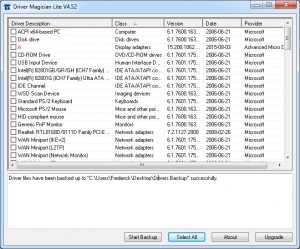
With Driver Magician Lite you can do one thing and one thing only – you can only backup drivers. You cannot easily restore drivers, you cannot update your drivers, and you cannot uninstall drivers. On the upside, backing up drivers with Driver Magician Lite is an incredibly straightforward process. The application’s interface has a simple layout that should not pose a problem to even the greenest of novice computer users.
Before you go get Driver Magician Lite and put it to the test, there are some technical details you need to know about. The following details:
Download – the download weighs in at some 1.5MB, which means that even on a less than spectacular internet connection, it will take very little time to get Driver Magician Lite off the web and onto your computer.
Installation – you can easily install Driver Magician Lite on several versions of the Microsoft-developed Windows operating system. Driver Magician Lite provides support for 98, SE, ME, 2000, XP, 2003, Vista, and Windows 7.
Limitations – there are no limitations, you can use Driver Magician Lite free of charge for as long as you want.
Driver Magician Lite is a Windows application that makes it a breeze to backup your drivers. It can’t do all the things its bigger brother Driver Magician can, but it is offered free of charge.
Pros
Cons
About GoldSolution Software
Details on GoldSolution Software and its products are available here.
Additional details on Driver Magician Lite are available here.
We now shift focus to another GoldSolution Software-developed application, mainly Driver Magician Lite. This is the freeware version of Driver Magician, which means you can use it free of charge for as long as you want. It also means that it doesn’t do all the things that Driver Magician does.
With Driver Magician Lite you can do one thing and one thing only – you can only backup drivers. You cannot easily restore drivers, you cannot update your drivers, and you cannot uninstall drivers. On the upside, backing up drivers with Driver Magician Lite is an incredibly straightforward process. The application’s interface has a simple layout that should not pose a problem to even the greenest of novice computer users.
Before you go get Driver Magician Lite and put it to the test, there are some technical details you need to know about. The following details:
Download – the download weighs in at some 1.5MB, which means that even on a less than spectacular internet connection, it will take very little time to get Driver Magician Lite off the web and onto your computer.
Installation – you can easily install Driver Magician Lite on several versions of the Microsoft-developed Windows operating system. Driver Magician Lite provides support for 98, SE, ME, 2000, XP, 2003, Vista, and Windows 7.
Limitations – there are no limitations, you can use Driver Magician Lite free of charge for as long as you want.
Driver Magician Lite is a Windows application that makes it a breeze to backup your drivers. It can’t do all the things its bigger brother Driver Magician can, but it is offered free of charge.
Pros
- Lightweight download
- Easy to use
- Backup drivers
- Works with Windows 7
- Freeware
Cons
- Not as feature rich as Driver Magician
About GoldSolution Software
Details on GoldSolution Software and its products are available here.
Additional details on Driver Magician Lite are available here.
System Requirements
Pentium 166MHz 32 MB of available RAM plus 3 MB of hard disk for installation
Do you like Driver Magician Lite
Advertising
Popular News
The free AboutOne app is currently exclusive to Windows Phone. The app is available for free in the Markeplace.
Google rolled out Chrome 19 to the Stable Channel. This version fixes some security problems and adds tab syncing capabilities.
Driver Magician Lite Awards
Driver Magician Lite Editor's Review Rating
Driver Magician Lite has been reviewed by George Norman on
13 Oct 2010. Based on the user interface, features and complexity, Findmysoft has rated
Driver Magician Lite
4
out of 5 stars, naming it ExcellentYour Rating
Top Downloads
2.
Opera5.
Trillian8.
AIM9.
Skype10.
Ad-Aware12.
Nero13.
Google Earth14.
Picasa15.
Winamp16.
iTunes17.
RealPlayer18.
uTorrent19.
eMule20.
WinRAR21.
BitComet22.
WinZip23.
Shareaza24.
CCleaner25.
Recuva26.
Tweak UI27.
CuteFTP Home29.
Adobe Reader30.
NewsPiperBecome A Fan!
Link To Us!
Driver Magician Lite
HTML Linking Code
HTML Linking Code
Latest Reviews